AI App Builder Guide for Non-Coders: What to Check
Use this ai app builder guide to choose a no-code tool by workflow, data, integrations, security, testing, and long-term control before you build.
Boletín gratuito
Recibe The Daily Match
Noticias de IA en lenguaje claro y una acción para probar hoy. Gratis, lunes y viernes.
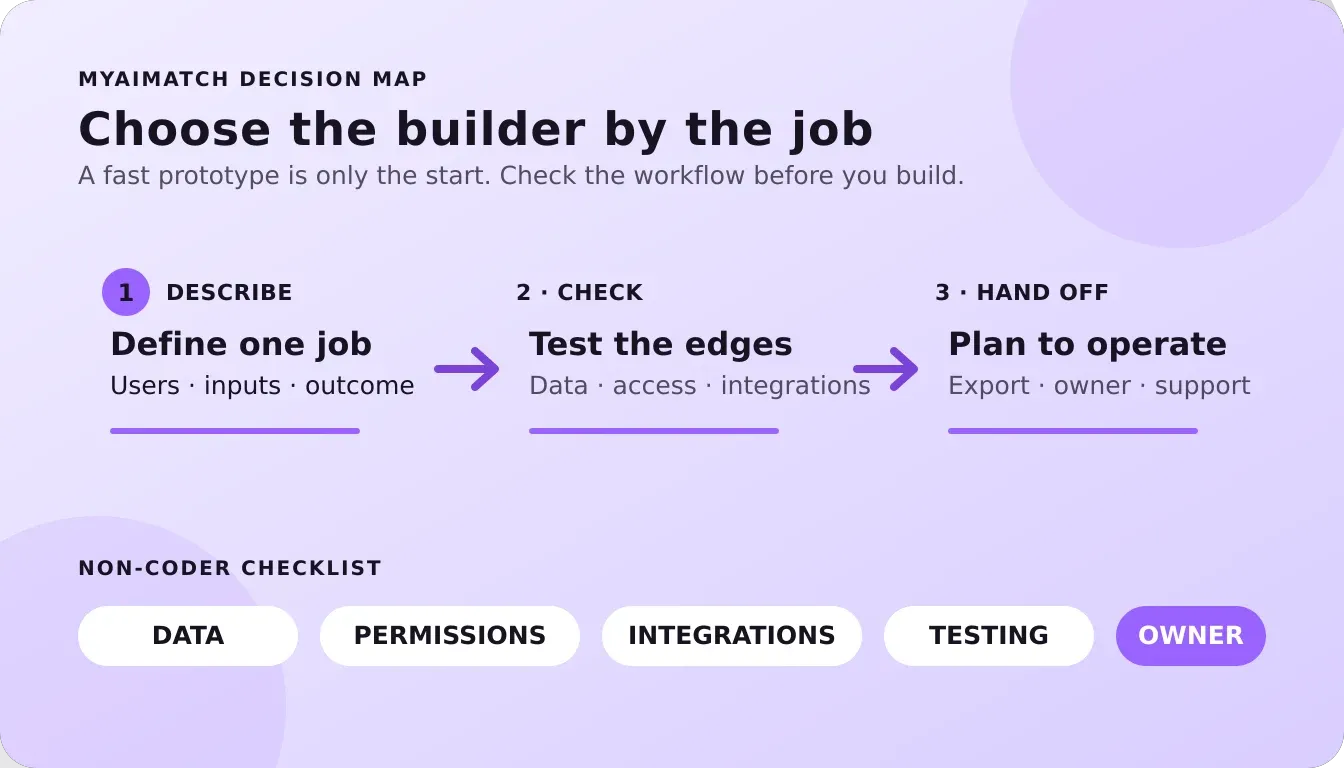
Building a useful app no longer begins with learning a programming language. For a founder, freelancer, or small team, it can begin with a clear description of the work that needs to happen: collect requests, organize records, connect tools, or give customers a simple place to take action.
An ai app builder can turn plain-language instructions into parts of an application, but the right choice depends on more than how quickly it generates a prototype. Check whether it handles your data, integrations, permissions, testing, deployment, and future changes at a level your team can manage.
Claim Your Free AI Match through the three-question MAI assessment to narrow your AI tool options before you build.
That makes the category easier to understand when you separate app generation from automation and coding assistance. Then look at what these tools actually do and where their limits appear.
What Is an AI App Builder?
An AI app builder is software that turns a plain-language description of an application into a working starting point. You might describe an intake form, an internal request tracker, or a reporting dashboard, and the builder may generate screens, data structures, and parts of the app logic. The exact amount of editing, testing, and setup still depends on the product and the complexity of your workflow.
The useful distinction is between a tool that only sketches an interface and one that supports real execution, data, and deployment. A polished set of screens is not the same as an app that can save records, apply rules, connect to the systems your team uses, and give people a reliable way to complete a task. Internal business tools and dashboards are common starting points because the workflow and audience are usually easier to define than those of a public consumer product.
How it differs from related AI tools
- AI app builders help create an application with screens, data, and behavior from a description or guided setup.
- Workflow automation tools connect existing services and trigger actions, such as moving a form submission into another system. They may not create a complete user-facing application.
- Code assistants help a developer write, explain, or revise code. They can offer more control, but they assume someone can review and maintain the result.
For a non-coder, expect to make decisions rather than simply press a button. You will need to describe the job clearly, choose what information the app stores, test edge cases, review permissions, and plan who will maintain it. Before comparing products, identify the role and workflow the app should support. The AI tools by role guide can help you organize that starting point.
Start With the App You Need, Not the Tool Name
The right starting point is the job your team needs done. "Build me an app" is too broad to guide a useful decision. Describe the users, the action they need to take, the information the app must handle, and what should happen after each action. Then choose an AI app builder that fits that job.
A prototype is for testing an idea with limited risk. You may need a simple flow, a few screens, and enough functionality to learn from early users. An internal tool serves your team instead. Think reporting dashboard, approval queue, intake form, or operations utility. Prioritize ease of updating, permissions, and connections to the systems your team already uses.
A client portal has a different burden. Clients may need separate accounts, reliable access to their information, and a clear way to submit or review work. A workflow layer may not need to be a standalone app at all. If the main goal is moving data between existing tools or triggering repeatable steps, an automation platform may be a better fit than a new interface.
A public product raises the bar again. Consider onboarding, account management, support, data handling, error recovery, and how you will maintain the experience after launch. A fast first version can still create technical and operational work that someone must own.
Use this short checklist before comparing builders:
- Job: Is this a prototype, internal tool, client portal, workflow layer, or public product?
- Users: Who needs access, and do different users need different permissions?
- Data: What information must the app store, display, or pass to another system?
- Control: Is the tool genuinely no-code for your team, or will you need technical help?
- Handoff: What happens if the first builder no longer fits your needs?
That last question matters early, not after launch. Check whether you can export or otherwise move the work, and estimate the effort required to maintain it. Founders can compare options in AI tools and workflows for founders, while freelancers may prefer the more role-specific guidance in AI tools for freelancers. Small teams can also review AI tools for small-business owners.
The 5 AI App Builder Types to Compare
"AI app builder" can describe several different jobs. The right choice depends less on how impressive the first generated screen looks and more on what must happen after the prototype: storing data, connecting systems, editing the underlying code, or putting the result in front of users. Use this comparison to identify the category you need before comparing individual tools.
| Builder type | Where it fits | Main tradeoff | Question to ask |
|---|---|---|---|
| Prompt-to-app builders | Turning a plain-language idea into an early interface, prototype, or simple working application. | Fast generation can hide decisions about data, permissions, error handling, and long-term maintenance. | Can I inspect and adjust the important behavior, or am I only reviewing a demo? |
| Visual database and app builders | Building internal tools, dashboards, forms, directories, or client-facing portals around structured records. | Convenience depends on the platform's data model and built-in controls, which may limit unusual workflows. | How will records, user access, relationships, and future changes be managed? |
| Workflow automation layers | Connecting an existing app to email, forms, spreadsheets, databases, and other business systems. | Automation can extend an app without replacing it, but multi-step workflows may become difficult to monitor and troubleshoot. | Which system owns the data, and what happens when a step fails? |
| Code-export builders | Creating a faster starting point while retaining the option to edit code, use version control, or hand work to a developer. | Export is not the same as easy portability. The result may still depend on platform-specific services or require technical cleanup. | What exactly can I export, and can another person run and maintain it? |
| Deployment and hosting tools | Publishing an app, managing its hosting environment, and moving a completed build toward production. | Hosting solves delivery, not product design, data modeling, authentication, or testing. | What does deployment include, and which application responsibilities remain mine? |
Match the first job to a catalog example: use these examples to frame a test, not as a promise that one tool fits every project.
| First job | Catalog example | What to verify before committing |
|---|---|---|
| Turn an idea into a testable interface | Lovable Tool Vault profile · Visit Lovable | Whether the generated result gives you enough control over data, authentication, testing, and handoff. |
| Connect existing systems and trigger work | Make Tool Vault profile · Visit Make | Which system owns the data, how failures are surfaced, and whether the workflow needs a separate user-facing app. |
| Publish and host a completed build | Netlify Tool Vault profile · Visit Netlify | What deployment covers and which responsibilities for app logic, data, permissions, and support remain with you. |
These categories can overlap. A single product may generate an interface, connect to data, and offer deployment, while another may handle only one layer. That is why export and lock-in deserve separate attention: a tool can let you download code yet still make its hosted database or integrations difficult to replace. Likewise, a free building experience may not include publishing or deployment, so check the path from draft to live app before committing time.
Review the Make Tool Vault profile when you need an integration layer, and use the approved Visit Make link only after confirming the workflow fit. When the build is ready to ship, compare the Netlify Tool Vault profile and its Visit Netlify path. These are catalog examples, not an exhaustive list, and some Visit links may earn myAImatch a commission at no extra cost to you.
Still comparing where to start? Claim Your Free AI Match to narrow your options before testing a builder.
What Should Non-Coders Check Before They Build?
A polished demo can hide the decisions that determine whether an app remains useful after launch. Before choosing an AI app builder, map the app's connections, data, users, and handoff plan. The goal is not to predict every technical problem. It is to make the important tradeoffs visible while changes are still inexpensive.
Check the boundaries of the app
List every integration the app needs, including email, payments, calendars, forms, databases, and reporting. Confirm that the builder supports those connections in the way your workflow requires, not merely that it mentions an integration. Then ask who owns the data, where it is stored, and how you can retrieve it.
Authentication and permissions are separate checks. Decide how people sign in, which records each person may view, and who can edit or delete them. A builder that can create a login screen may not automatically provide the access rules your process needs. Research on the security impact of online app generators shows why these boundaries deserve deliberate review, rather than being treated as a byproduct of generation (academic research on online app-generator security).
Check the handoff and ongoing work
Ask how much you can customize, whether the generated code or data can be exported, and whether you can move the app to another host. Export and lock-in are distinct selection considerations, so read the actual handoff terms instead of assuming portability. Also identify who will handle monitoring, bug fixes, access changes, backups, and support after the initial build.
NIST's generative AI profile treats trustworthiness as a lifecycle concern, not a one-time setup task. It is voluntary guidance for incorporating trustworthiness into AI products and systems, and it recommends defining acceptable-use policies for AI interfaces and human-AI configurations (NIST generative AI risk guidance). Use that framing to decide what the app may do, what requires human review, and what data should never be entered.
Pre-build checklist
- Integrations: Are the required systems supported, with the needed permissions and data flow?
- Data: Who owns the records, where are they stored, and can you export them?
- Access: Are authentication, roles, and record-level permissions explicit?
- Control: Can you customize behavior, inspect changes, and recover from errors?
- Handoff: Can you export the app or data, change hosting, and obtain useful support?
- Maintenance: Who will test updates, manage users, monitor failures, and review AI outputs?
Can You Build a Production App Without Writing Code?
Sometimes. An AI app builder can help a non-coder turn a clear workflow into a working prototype, interface, database connection, or internal tool. It can accelerate the first version and reduce the amount of routine setup. It does not remove decisions about access, data, failure cases, testing, or ongoing ownership.
Think of production readiness as a process rather than a feature. Before real users depend on the app, confirm what it does, what information it can access. Who can change it, and how someone will respond when an integration fails. Testing and deployment are separate steps, not two names for the same finish line.
- Define one narrow job. Write the input, the expected result, the users, and the point at which a person must review the output. A small internal workflow is easier to evaluate than an entire business system.
- Map data and access. List every source the app will use and decide which roles need read, create, edit, or delete access. Keep sensitive data out of the first version unless the handling, retention, and permissions are understood.
- Build a testable first version. Use representative but safe data. Check ordinary paths as well as missing fields, duplicate submissions, invalid inputs, unavailable services, and partial responses. Do not treat a successful demo as proof that the workflow is reliable.
- Set acceptable-use rules. Document what the app may and may not do, when a human must approve an action, and how users should report a questionable result. NIST specifically recommends acceptable-use policies for generative AI interfaces and human-AI configurations (NIST AI RMF).
- Deploy with an owner and a maintenance plan. Decide who monitors errors, reviews access, updates connected services, handles user questions, and tests changes before release. Revisit the app as its data, users, and business rules change.
The honest answer is that you may be able to build without writing code, but you should not plan to operate without technical judgment. If the app handles sensitive information, makes consequential decisions, or must support many users, involve someone who can review its security and reliability before launch.
How myAImatch Helps You Choose an AI App Builder
Choosing an AI app builder is easier when you begin with the job you need to complete, rather than the most impressive demo you have seen. You may need a customer-facing prototype, an internal workflow, or a simple way to turn an idea into something testable. The right choice depends on your role, technical comfort, data needs, and how much control you want after the first version works.
That is where myAImatch can help as a discovery and recommendation step. The free three-question MAI assessment uses your answers to recommend options from a hand-reviewed AI Tool Vault. It is designed to narrow a crowded field into tools that may better fit your situation, instead of asking you to compare every app builder on the market.
The recommendations should still be treated as a starting point. The Vault is not an exhaustive or permanently fixed catalog, and a match does not replace testing the tool with your own workflow, data, permissions, and publishing requirements.
You remain responsible for confirming whether a builder supports the integrations, export options, hosting model, and maintenance process your project needs. myAImatch separately offers paid AI implementation and systems setup, an AI strategy roadmap, and fractional advisory services for teams that want help moving from selection to rollout. Those services are not part of the MAI match result and require a separate scope.
- Founders can explore AI tools and workflows for founders when speed and focus matter.
- Small-business owners can review AI tools for small-business owners with day-to-day constraints in mind.
MAI is software discovery, not an app builder, custom implementation service, or guarantee that a project will launch without technical decisions. If you want a more focused place to begin, Claim Your Free AI Match and use the recommendation as one input in your evaluation.
Frequently Asked Questions
Can I build a production app with an AI app builder?
You can build a useful production candidate, but generated screens are not the same as a finished product. Test core workflows, authentication, permissions, data handling, error states, backups, and deployment before real users depend on it. Start with a narrow use case, then maintain it like any other software.
Which AI app builder is best for beginners?
The best starting point is the one that matches your workflow and explains its limits clearly. Look for a visual testing loop, plain-language setup, sensible defaults, and a way to get help when a request fails. Try a small, reversible project first rather than choosing based only on a long feature list.
Do AI app builders support integrations like Stripe or Zapier?
Some do, but integration support varies by builder, plan, connector, and authentication method. Before choosing one, list the systems your workflow must reach and confirm that each connection supports the actions you need. Such as creating records, receiving webhooks, or handling failures. Test the integration with sample data before connecting live accounts.
How should I evaluate security before using one?
Ask where data is stored, who can access it, how credentials are protected, and what controls exist for permissions, logging, deletion, and recovery. Define acceptable uses for the app and review risks throughout its lifecycle. NIST recommends acceptable-use policies for generative AI interfaces and human-AI configurations: NIST guidance.
How do I move my app off an AI app builder?
Check portability before you build: determine whether you can export source code, database contents, assets, configuration, and a usable deployment process. Exporting code alone may not reproduce hosted services or integrations. Document dependencies and test a small migration early, while the app is still simple.
Ready to Find Your AI App Builder Match?
Choosing an AI app builder is easier when you start with your actual workflow, comfort level, and desired outcome. Claim Your Free AI Match through the three-question MAI assessment to receive personalized recommendations from the hand-reviewed AI Tool Vault. It is a practical way to narrow your options before you commit time to testing and setup.
You might also like
Boletín gratuito
Recibe The Daily Match
Noticias de IA en lenguaje claro y una acción para probar hoy. Gratis, lunes y viernes.